---
title: Accessibility
description: Accessibility and Glossary
---
[Skip to content](https://support.pantrysoft.com/accessibility#main-content)
English
Show submenu for translations
[More support](https://support.pantrysoft.com/kb-tickets/new?hsLang=en)

Open main navigation
Close main navigation
- English
Show submenu for translations
- [More support](https://support.pantrysoft.com/kb-tickets/new)
- [Go to pantrysoft.com](https://app.pantrysoft.com/login)
[Go to pantrysoft.com](https://app.pantrysoft.com/login)
Welcome to the PantrySoft knowledge base. How can we help you?
- There are no suggestions because the search field is empty.
1. [Knowledge Base](https://support.pantrysoft.com/?hsLang=en)
2. [Getting Started](https://support.pantrysoft.com/getting-started?hsLang=en)
# Accessibility
## PantrySoft is built with accessibility in mind and includes additional settings to support a range of user needs. This article outlines the available Accessibility Settings and includes a glossary of terms to help you better understand and use them.
**How to access Accessibility Settings:***Setup \> General Settings \> Accessibility*
---
#### **Setting to replace Hold to Confirm with regular press buttons**
Setting better supports keyboard interactions for Users unable to use a mouse.
**PLEASE NOTE:**
**We do not recommend making changes to this setting unless necessary in order to prevent accidental actions. The setting is defaulted to Yes.**
**How to access:***Setup \> General Settings \> Hold to Confirm Enabled*
**
---
#### **Popup Notification Display**
#### Setting to give users more control over how pop up notifications behave*.*
***How to access:**Setup \> General Settings \> Accessibility*
**Details:**
- This setting allows users to set the amount of time in seconds that non-error pop ups appear on the screen before automatically disappearing. Set to 0 to disable automatic dismissal.
****
**Notes:
Error notifications do not automatically disappear and must be dismissed manually.**
---
#### **Focus on Search Bar in Dashboard**
#### Setting gives Users control over page load on Dashboard.
**How to access:***Setup \> General Settings \> Accessibility \> Autofocus on Search Bar in Dashboard*
#### ****
**Details:**
When set to "No" autofocus shifts to the top of the DOM. This can be beneficial for users using screen readers to get the full context of the page.
When set to "Yes" autofocus shifts to the Client search bar on Dashboard.

---
#### **Enable Inventory Item Row Click to Edit**
Setting gives Users control over page load on New Visit screen in Dashboard.
**How to access:***Setup \> General Settings \> Accessibility \> Enable Inventory Row Click to Edit*
**
***Details:***
When set to "Yes", Users are able to edit Inventory Items on all interfaces with the inventory distributor by clicking the entire row, rather than using the Pencil Icon.
---
#### **Shop Tile Accessibility**
Setting gives Users control over Inventory Tiles in Storefront and ShopView.
**How to access:***Setup \> General Settings \> Accessibility \> Shop Tile Accessibility Mode*
******
***Details:***
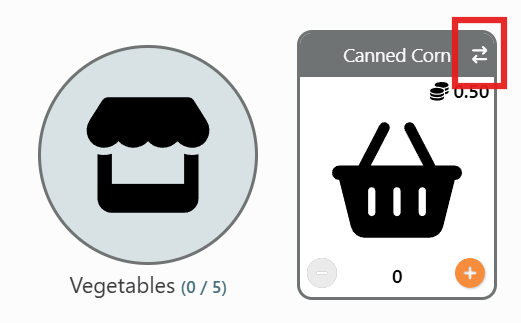
When set to "Yes", setting enhances screen reader accessibility for Inventory Tiles in Storefront and SHopView by adding flip tile specific buttons and removing animations.
---
#### **Focus at the top of Visits**
Setting gives Users control over page load on New Visit screen in Dashboard.
**How to access:***Setup \> General Settings \> Accessibility \> Always Focus at Top of Visits and Receives on Load*
**
**Details:**
When set to "No" autofocus shifts to Inventory when logging a new Visit on Dashboard.
When set to "Yes" autofocus shifts to the top of the Visit page when logging a new Visit on Dashboard.
---
#### **Basic Color Input**
Setting gives Users control over background color for Items and Item Types in Cart Options.
**How to access:**
*Setup \> General Settings \> Accessibility Settings \> Basic Color Input*
**
**Details:**
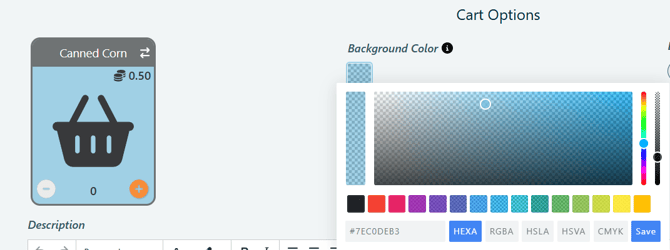
- When setting is set to No, you will be able to select the color using the background color selector.
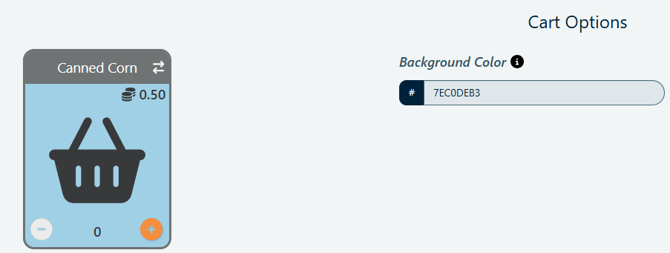
- When setting is set to Yes, you will be able to type in the hex color code.
---
#### **Glossary**
- **Toast** - Toasts are short, pop up notifications that provide quick feedback to Users.
- **Tippy** - Tippies are the information that pops up when selecting the "i" icon next to settings.

- **/** - used to show division of Items to Item Limits on Visits with Inventory Items.

- **Inventory Distributor** - Any place in PantrySoft where Inventory can be added. Examples include Visits, Visit Templates, Inventory Management and Lockers.
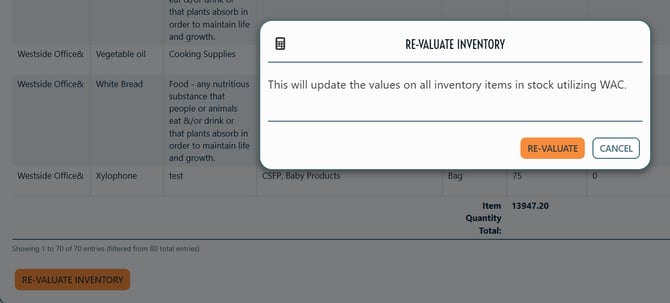
- **Re-Valuate** - Updates values on all Inventory Items. Visible to Org Admins with the setting Inventory Valuation Method set to WAC or Last Receive.
- [Getting Started](https://support.pantrysoft.com/getting-started?hsLang=en#main-content)
- [Users](https://support.pantrysoft.com/getting-started?hsLang=en#users)
- [PantrySoft Interfaces](https://support.pantrysoft.com/getting-started?hsLang=en#pantrysoft-interfaces)
- [Inventory](https://support.pantrysoft.com/getting-started?hsLang=en#inventory)
- [Guest/Client Registration](https://support.pantrysoft.com/getting-started?hsLang=en#guest-client-registration)
- [Visits](https://support.pantrysoft.com/getting-started?hsLang=en#visits)
- [Client Portal - Scheduling](https://support.pantrysoft.com/getting-started?hsLang=en#client-portal-scheduling)
- [Reporting](https://support.pantrysoft.com/getting-started?hsLang=en#reporting)
- [Additional Admin Guides](https://support.pantrysoft.com/additional-admin-guides?hsLang=en#main-content)
- [Client Registration & Visits](https://support.pantrysoft.com/additional-admin-guides?hsLang=en#client-registration-visits)
- [Additional Features](https://support.pantrysoft.com/additional-admin-guides?hsLang=en#additional-features)
- [Inventory Management](https://support.pantrysoft.com/additional-admin-guides?hsLang=en#inventory-management)
- [Additional Paid Features](https://support.pantrysoft.com/additional-admin-guides?hsLang=en#additional-paid-features)
- [Tags](https://support.pantrysoft.com/additional-admin-guides?hsLang=en#tags)
- [Scheduling Appointments](https://support.pantrysoft.com/additional-admin-guides?hsLang=en#scheduling-appointments)
- [Scheduling and Schedule Templates](https://support.pantrysoft.com/scheduling-and-schedule-templates?hsLang=en)
- [User Interfaces](https://support.pantrysoft.com/user-interfaces?hsLang=en#main-content)
- [Client Portal/ Online Store- Admin & Setup Guides](https://support.pantrysoft.com/user-interfaces?hsLang=en#client-portal-online-store-admin-setup-guides)
- [Client Portal/ Online Store- Customer Guides](https://support.pantrysoft.com/user-interfaces?hsLang=en#client-portal-online-store-customer-guides)
- [Packing/ Kitchen Screens and Reports](https://support.pantrysoft.com/user-interfaces?hsLang=en#packing-kitchen-screens-and-reports)
- [Special Workflows](https://support.pantrysoft.com/special-workflows?hsLang=en#main-content)
- [Delivery/Meals on Wheels](https://support.pantrysoft.com/special-workflows?hsLang=en#delivery-meals-on-wheels)
- [University](https://support.pantrysoft.com/special-workflows?hsLang=en#university)
- [FAQ & Miscellaneous](https://support.pantrysoft.com/faq-miscellaneous?hsLang=en#main-content)
- [Client Troubleshooting](https://support.pantrysoft.com/faq-miscellaneous?hsLang=en#client-troubleshooting)
- [Other FAQs](https://support.pantrysoft.com/faq-miscellaneous?hsLang=en#other-faqs)
- [Messaging and Notifications](https://support.pantrysoft.com/faq-miscellaneous?hsLang=en#messaging-and-notifications)
- [Other Reports](https://support.pantrysoft.com/faq-miscellaneous?hsLang=en#other-reports)
- [Technical Documentation](https://support.pantrysoft.com/faq-miscellaneous?hsLang=en#technical-documentation)
- [Reporting Tools](https://support.pantrysoft.com/reporting-tools?hsLang=en#main-content)
- [Merging Duplicate Client Accounts](https://support.pantrysoft.com/reporting-tools?hsLang=en#merging-duplicate-client-accounts)
- [Release Notes](https://support.pantrysoft.com/release-notes?hsLang=en#main-content)
- [2026 Releases](https://support.pantrysoft.com/release-notes?hsLang=en#2026-releases)
- [2025 Releases](https://support.pantrysoft.com/release-notes?hsLang=en#2025-releases)
- [2024 Releases](https://support.pantrysoft.com/release-notes?hsLang=en#2024-releases)
- [Recorded Webinars](https://support.pantrysoft.com/recorded-webinars?hsLang=en#main-content)
- [2026 Webinar Recordings](https://support.pantrysoft.com/recorded-webinars?hsLang=en#2026-webinar-recordings)
- [2025 Webinar Recordings](https://support.pantrysoft.com/recorded-webinars?hsLang=en#2025-webinar-recordings)
- [Special/ Niche Features](https://support.pantrysoft.com/special-niche-features?hsLang=en)
- [Advanced Inventory](https://support.pantrysoft.com/advanced-inventory?hsLang=en)
- [CSFP Module](https://support.pantrysoft.com/csfp-module?hsLang=en#main-content)
- [CSFP Overview](https://support.pantrysoft.com/csfp-module?hsLang=en#csfp-overview)
- [Managing CSFP Participants](https://support.pantrysoft.com/csfp-module?hsLang=en#managing-csfp-participants)
- [Recording CSFP Visits](https://support.pantrysoft.com/csfp-module?hsLang=en#recording-csfp-visits)
- [CSFP Data Management](https://support.pantrysoft.com/csfp-module?hsLang=en#csfp-data-management)
- [PantrySoft Volunteer](https://support.pantrysoft.com/pantrysoft-volunteer?hsLang=en)
# PantrySoft
pantrysoft.com Help Center
Copyright © 2026, PantrySoft