---
title: Data Visualization Base Full Activity Counts Revised
description: Data Visualization Base Full Activity Counts
---
[Skip to content](https://support.pantrysoft.com/data-visualization-base-full-activity-counts-revised#main-content)
English
Show submenu for translations
[More support](https://support.pantrysoft.com/kb-tickets/new?hsLang=en)

Open main navigation
Close main navigation
- English
Show submenu for translations
- [More support](https://support.pantrysoft.com/kb-tickets/new)
- [Go to pantrysoft.com](https://app.pantrysoft.com/login)
[Go to pantrysoft.com](https://app.pantrysoft.com/login)
Welcome to the PantrySoft knowledge base. How can we help you?
- There are no suggestions because the search field is empty.
1. [Knowledge Base](https://support.pantrysoft.com/?hsLang=en)
2. [Reporting Tools](https://support.pantrysoft.com/reporting-tools?hsLang=en)
# Data Visualization Base Full Activity Counts Revised
## Data Visualization Base Full Activity Counts Revised provides visual representation and insights into the total Visit, Service and Distribution activity for your pantry, as well as data collected through Custom Questions.
**How to access:**
*Reporting \> Data Visualizations \> Base Full Activity Counts Revised*
**Main Tab**
This Visualization has the following set of filters - named **CONTROLS** - to help the user access the desired data. Use the dropdown arrow to open the control panel.
**
These controls can be changed to make the Data Visualization reflect different date ranges and other filters. Filters set in this control panel will reflect across each tab in this report.
Controls available include:
- Date Range
- Location
- Visit Type
- Age Bracket
- Viewing Active/ Inactive Custom Questions
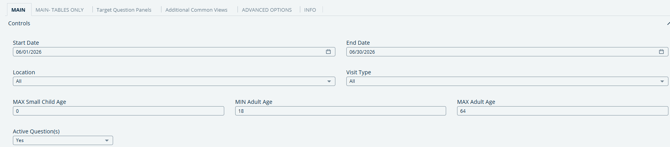
The Main Tab provides numerical and visual data based on the Controls you set.
---
**Main - Agg Tables Only Tab**
This tab provides aggregated info from the Main tab, but without the visuals.
---
**Target Question Panels Tab**
This Tab provides visuals for the result of a single custom question.
**Notes:** *You must select a question from the dropdown to populate visuals.*
---
**Additional Common Views Tab **
This Tab provides visuals for additional data that is commonly requested, such as Counts by family size and Counts by program.
---
**Advanced Options Tab **
This Tab provides advanced controls for common but minority pantry workflows. Specifically, the filters here provide pantries fine control over the definition of a household's "First" Visit, and also allow Pantries to count ranged Demographic answers as if everyone in the household answered as the Primary Member did. Filters set in this section will reflect across each tab in this report.
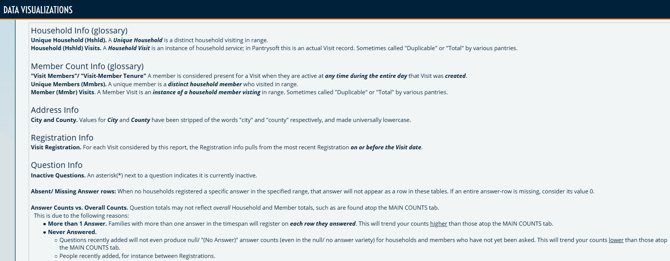
**Info Tab **
This Tab provides a glossary of terms used throughout this Report.
- [Getting Started](https://support.pantrysoft.com/getting-started?hsLang=en#main-content)
- [Users](https://support.pantrysoft.com/getting-started?hsLang=en#users)
- [PantrySoft Interfaces](https://support.pantrysoft.com/getting-started?hsLang=en#pantrysoft-interfaces)
- [Inventory](https://support.pantrysoft.com/getting-started?hsLang=en#inventory)
- [Guest/Client Registration](https://support.pantrysoft.com/getting-started?hsLang=en#guest-client-registration)
- [Visits](https://support.pantrysoft.com/getting-started?hsLang=en#visits)
- [Client Portal - Scheduling](https://support.pantrysoft.com/getting-started?hsLang=en#client-portal-scheduling)
- [Reporting](https://support.pantrysoft.com/getting-started?hsLang=en#reporting)
- [Additional Admin Guides](https://support.pantrysoft.com/additional-admin-guides?hsLang=en#main-content)
- [Client Registration & Visits](https://support.pantrysoft.com/additional-admin-guides?hsLang=en#client-registration-visits)
- [Additional Features](https://support.pantrysoft.com/additional-admin-guides?hsLang=en#additional-features)
- [Inventory Management](https://support.pantrysoft.com/additional-admin-guides?hsLang=en#inventory-management)
- [Additional Paid Features](https://support.pantrysoft.com/additional-admin-guides?hsLang=en#additional-paid-features)
- [Tags](https://support.pantrysoft.com/additional-admin-guides?hsLang=en#tags)
- [Scheduling Appointments](https://support.pantrysoft.com/additional-admin-guides?hsLang=en#scheduling-appointments)
- [Scheduling and Schedule Templates](https://support.pantrysoft.com/scheduling-and-schedule-templates?hsLang=en)
- [User Interfaces](https://support.pantrysoft.com/user-interfaces?hsLang=en#main-content)
- [Client Portal/ Online Store- Admin & Setup Guides](https://support.pantrysoft.com/user-interfaces?hsLang=en#client-portal-online-store-admin-setup-guides)
- [Client Portal/ Online Store- Customer Guides](https://support.pantrysoft.com/user-interfaces?hsLang=en#client-portal-online-store-customer-guides)
- [Packing/ Kitchen Screens and Reports](https://support.pantrysoft.com/user-interfaces?hsLang=en#packing-kitchen-screens-and-reports)
- [Special Workflows](https://support.pantrysoft.com/special-workflows?hsLang=en#main-content)
- [Delivery/Meals on Wheels](https://support.pantrysoft.com/special-workflows?hsLang=en#delivery-meals-on-wheels)
- [University](https://support.pantrysoft.com/special-workflows?hsLang=en#university)
- [FAQ & Miscellaneous](https://support.pantrysoft.com/faq-miscellaneous?hsLang=en#main-content)
- [Client Troubleshooting](https://support.pantrysoft.com/faq-miscellaneous?hsLang=en#client-troubleshooting)
- [Other FAQs](https://support.pantrysoft.com/faq-miscellaneous?hsLang=en#other-faqs)
- [Messaging and Notifications](https://support.pantrysoft.com/faq-miscellaneous?hsLang=en#messaging-and-notifications)
- [Other Reports](https://support.pantrysoft.com/faq-miscellaneous?hsLang=en#other-reports)
- [Technical Documentation](https://support.pantrysoft.com/faq-miscellaneous?hsLang=en#technical-documentation)
- [Reporting Tools](https://support.pantrysoft.com/reporting-tools?hsLang=en#main-content)
- [Merging Duplicate Client Accounts](https://support.pantrysoft.com/reporting-tools?hsLang=en#merging-duplicate-client-accounts)
- [Release Notes](https://support.pantrysoft.com/release-notes?hsLang=en#main-content)
- [2026 Releases](https://support.pantrysoft.com/release-notes?hsLang=en#2026-releases)
- [2025 Releases](https://support.pantrysoft.com/release-notes?hsLang=en#2025-releases)
- [2024 Releases](https://support.pantrysoft.com/release-notes?hsLang=en#2024-releases)
- [Recorded Webinars](https://support.pantrysoft.com/recorded-webinars?hsLang=en#main-content)
- [2026 Webinar Recordings](https://support.pantrysoft.com/recorded-webinars?hsLang=en#2026-webinar-recordings)
- [2025 Webinar Recordings](https://support.pantrysoft.com/recorded-webinars?hsLang=en#2025-webinar-recordings)
- [Special/ Niche Features](https://support.pantrysoft.com/special-niche-features?hsLang=en)
- [Advanced Inventory](https://support.pantrysoft.com/advanced-inventory?hsLang=en)
- [CSFP Module](https://support.pantrysoft.com/csfp-module?hsLang=en#main-content)
- [CSFP Overview](https://support.pantrysoft.com/csfp-module?hsLang=en#csfp-overview)
- [Managing CSFP Participants](https://support.pantrysoft.com/csfp-module?hsLang=en#managing-csfp-participants)
- [Recording CSFP Visits](https://support.pantrysoft.com/csfp-module?hsLang=en#recording-csfp-visits)
- [CSFP Data Management](https://support.pantrysoft.com/csfp-module?hsLang=en#csfp-data-management)
- [PantrySoft Volunteer](https://support.pantrysoft.com/pantrysoft-volunteer?hsLang=en)
# PantrySoft
pantrysoft.com Help Center
Copyright © 2026, PantrySoft