
Enhancements & Improvements
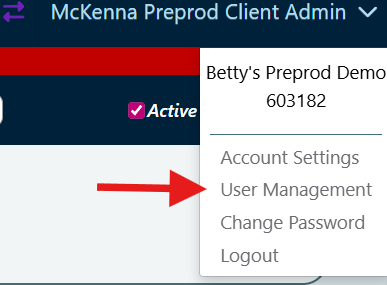
User Management has been moved from Set Up to Account Settings.
- You can now access User Management by clicking the dropdown menu under your username in the top right corner of the PantrySoft Admin screen.
New Features
User Management Additional Role
A new role, User Management, has been added and can now be assigned to Org Admins. This role grants Org Admins the ability to manage all users within the organization, including adding, editing, and removing user accounts as needed.

Details:
Please note: If you remove this role from your own user account, you will no longer be able to reassign it to yourself.
How to access User Management and Additional Roles:
-
Click on your User Name in the top right corner of your account.
-
Select User Management.
-
Navigate to Additional Roles to assign or remove roles.
Logging out all Users:
This role also includes the ability to log all users out of the system.
How to log out all users:
-
Click on your User Name in the top right corner of your account.
-
Client on Account Settings
-
Select Logout All Users to log everyone out of the system at once.
-png.png?width=206&height=60&name=image%20(1)-png.png)
Agency Admin User Role
An Agency Admin User has the ability to generate reports for all agencies linked to your organization. This allows them to view and analyze data across multiple agencies, providing a comprehensive overview of performance and activity within the organization.

Please Note: To use this feature, request that PantrySoft Support enable the internal setting.