
New Features
Birthdate Fields in PantrySoft
Two enhancements have been added to birthdate fields for an improved client intake process.
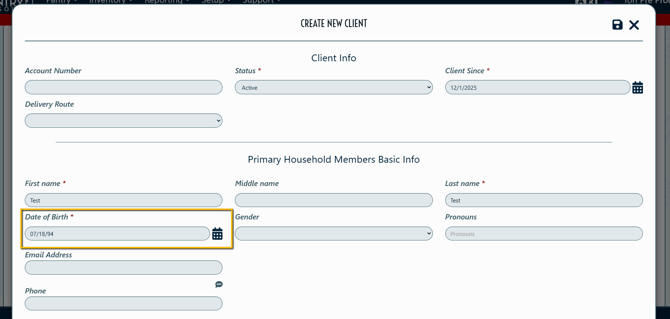
Date of Birth Field Autoformat
Any form with the Date of Birth field now autoformats without requiring the User to use the calendar selector widget, nor manually type dashes.
Setting to Allow Future Birthdates
Details:
- Added a setting allowing for future birthdates to be collected when adding additional household member information.
- Use case: client intake for families with prenatal babies.
- When enabled, this setting allows for a birthdate to be added up to 9 months from today's date.
How to access:
Setup > General Settings > locate new setting Allow Future Birthdates > Set to "Yes"
Immediate Action Required:
Before this setting was released, birth dates could be added up until 12/31 of the current calendar year. Admins who were collecting future birthdates up to 12/31 of the current year will need to enable the new setting to continue inputting future birthdates.
"Visit Fulfillment by Client" Inventory Report - added "Sort By" Option
Added an additional Sort By option for the system Inventory Report "Visit Fulfillment by Client", give Users more flexibility when running this operational report.
Details:
- "Visit Fulfillment by Client" runs in alphabetical order by client name by default.
- Now, Users can run the report and choose for it to sort by Visit Date/Time
How to access:
Open the Reporting tab > select Inventory Reports > Choose "Visit Fulfillment by Client"
This report is only available in the system if "Enable Item Fulfillment" is set to "yes" under Setup > Inventory Settings
Eligibility Integrations: Double Eligibility Checkmarks
Note: this released feature only applies to organizations that have an eligibility integration as well as the appropriate settings enabled.
To determine if a potential client is considered "eligible", PantrySoft scans a pre-dispensed organizational Allow List (called a Flatfile) looking for a match on emails and account numbers/organizational IDs. If the potential client does not match what is in the Flatfile, they are considered ineligible.
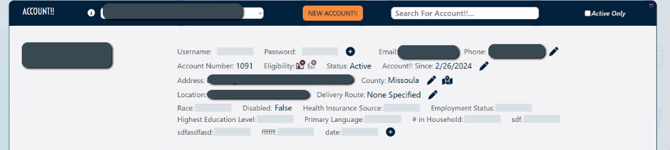
Previously, the Client Record header only indicated whether the client was a match or not. Now, pantry admins can access more detailed information about what aspect of the client data is not a match - the email or the account number, as well as what settings under-the-hood are impacting this. This increased visibility will help pantry admins understand eligibility messages potential clients receive when trying to access the Portal.
Details:
- A greenCheckmark indicates an Email match or an Account Number match is found in the Flatfile, depending on which icon is marked.
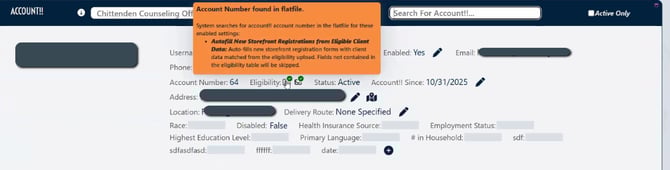
- A red X on either indicates that a match is not found in the Flatfile.
- A grey X on either indicates that the field is not applicable to that client or the account settings configuration.
- Hover over the "i" icon for more specific information about what the icon indicates about this client and what associated under-the-hood settings are impacting eligibility.
How to access:
- Pantry > Browse Clients: now includes a column with the double checkmarks representing Flatfile matches, or lack thereof.
- Client Record Header in Dashboard/Org view: Client record headers previously included only one eligibility checkmark and now feature both.
- Client Record in Kiosk: Loaded Client Record in Kiosk now includes the double checkmarks with the correct eligibility settings configured.
Additional Notes:
The settings referenced in the Informational Tippy (when users hover over the "i" icon) have to be managed by PantrySoft Staff, so Admin Users will not be able to change those settings. Please reach out to support@pantrysoft.com for further configuration.
Users previously using a Dynamic Report to check the organizational eligibility list will no longer have access to that report. Attempting to run that report will throw an exception. This is by design, as the new eligibility visibility features replace that report it in a data-secure manner.
Lockers Integrations
Note: this released feature only applies to organizations that have a Locker integration as well as the appropriate settings enabled.
Details:
- Added the ability to have ADA-specific lockers for increased accessibility.
- Added Appointment Time to "Date" column in Locker Visit Dashboard
- Added SMS support for code delivery.
- Added Drop-Off and Pick-Up Events for Quadient Lockers.
Please reach out to support@pantrysoft.com for assistance setting up added Lockers Integrations features.