New Features
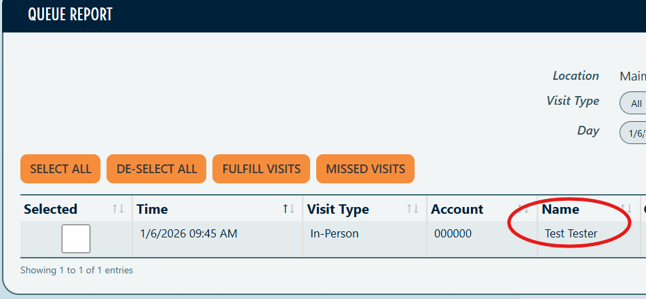
Click Client name to go to Client Record on Queue Report
Org Users accessing Queue Report will be taken to the Client Record when clicking on Client name in the Name column. By clicking any other column in the row, it will open to the Visit Record.
How to access:
Reporting > Queue Report > selecting Client name in Name Column directs to Client Record.
Single Item Groups in Inventory automatically set as Case
Item Groups with multiples of a single item will automatically be set as a Case. This is reflected in the Item Group list. Item Groups with a variety of items will not have the Case label.
How to access:
Inventory > Item Groups

Details:
- With this update, all Groups containing multiples with the same Item will automatically be labeled as a Case. This is set by the system and can not be changed manually.
- This will make Groups easier to identify if the Group is a variety of different Items compared to Groups of a single Item.
Compact Visit Ticket
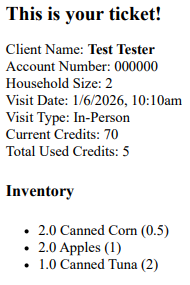
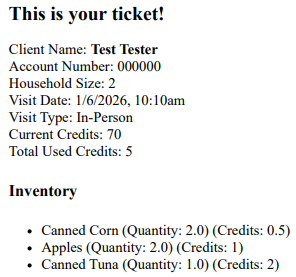
This feature introduces a Compact formatting of Visit Tickets meant to offer display options depending on preference.
How to access:
Setup > Visit Settings > Item Formatting > use dropdown to select Compact or Classic.

Details:
- Toggling this setting to Compact provides a Visit Ticket that displays as follows:
- Toggling this setting to Classic provides a Visit Ticket that displays as follows:
Enhancements & Improvements
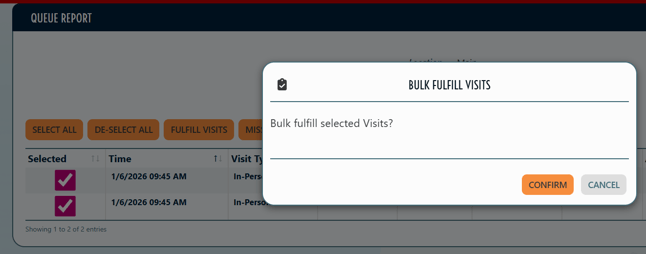
- Enhanced confirmation messages when bulk action is taken on Queue Report.
Details:
- When bulk action such as marking multiple Visits as Fulfilled, you will receive a pop-up message to confirm the action.