
New Features
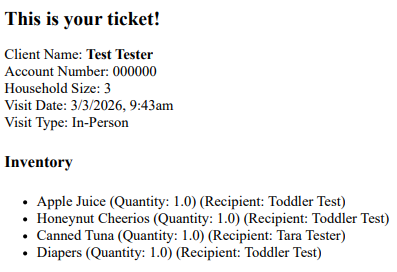
Household Member Item Assignment Reflecting on Ticket
New settings have been added to reflect which Household Members have received Items on Visit Tickets.
How to access:
-
You will need to have two settings turned to "yes" to see this feature.
Setup > Client Settings > Show Household Member Dropdown
Setup > Visit Settings > Show Household Member Dropdown

Details:
When logging a Visit for a Client, you will be able to select which Items go to specific Household Members using the Household Member dropdown.

When printing a Visit Ticket, you will see which Household Member received Items.
Item Value on Ticket
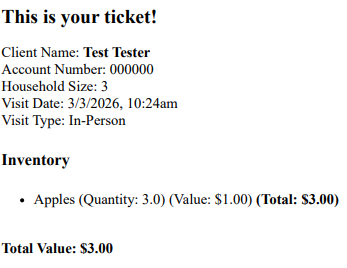
New settings have been added to reflect the value of Items on Visit Tickets.
How to access:
Setup > Visit Settings > Show Item Values on Visit Tickets

When adding Items to Visits, you will see the Value of the Items reflected and tallied on the Visit Ticket.
Client Notes move with Household Members
If settings are configured to allow Client Notes to be attached to specific Household Members, the Note will now follow the Household Member if they are moved to another Household.
How to access:
Setup > Client Settings > Show Household Member Dropdown
Details:
- When this setting is enabled, Notes assigned to Household Members will follow the Household Member.
Organization Name on Storefront
Users can now choose to use an alternate header text on the Client Portal login page.
How to access:
Setup > Storefront Settings > Replace the Organization Name on Login Page

Details:
- If the text box is blank, the page header will default to your organization name.