
New Features
Client Duplication Report
Client Duplication Report allows Users to review Duplicate Client Records and merge data in to one Client Record, allowing you to select what data is carried over to the new Client Record.
Details:
- Check out our Knowledge Base article to learn more about this feature!
Focus at the top of Visits
New settings have been added to give Users control over page load on New Visit screen in Dashboard.
How to access:
Setup > General Settings > Accessibility > Always Focus at Top of Visits and Receives on Load

Details:
When set to "No" autofocus shifts to Inventory when logging a new Visit on Dashboard.
When set to "Yes" autofocus shifts to the top of the Visit page when logging a new Visit on Dashboard.
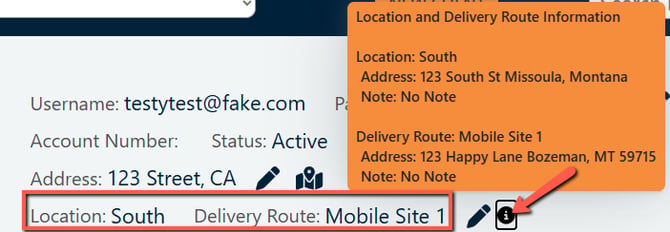
Display Location address and Location note when hovering over the tooltip on the client dashboard. Same for Delivery Route or whatever the label for Delivery Route has been changed to i.e. Subsite, Mobile Site etc.
For accounts utilizing Client Specific Locations and/or Deliver Routes there is now a tooltip that you can hover over to see more details about the Location and/or Delivery Route:
How to access:
To update the location details click on your name in the upper right corner and select Account Settings. Once on the Account Setting page you will see the locations(s) toward the bottom of the page and if you click on the edit pencil you can update the details:

To update the delivery route details go to Setup -> Delivery Routes and click on the edit pencil:
