
New Features
Demographic Question options for Primary and Additional Household Members
New settings have been added to give Users more control over Demographic Questions, and who the questions are applicable for.
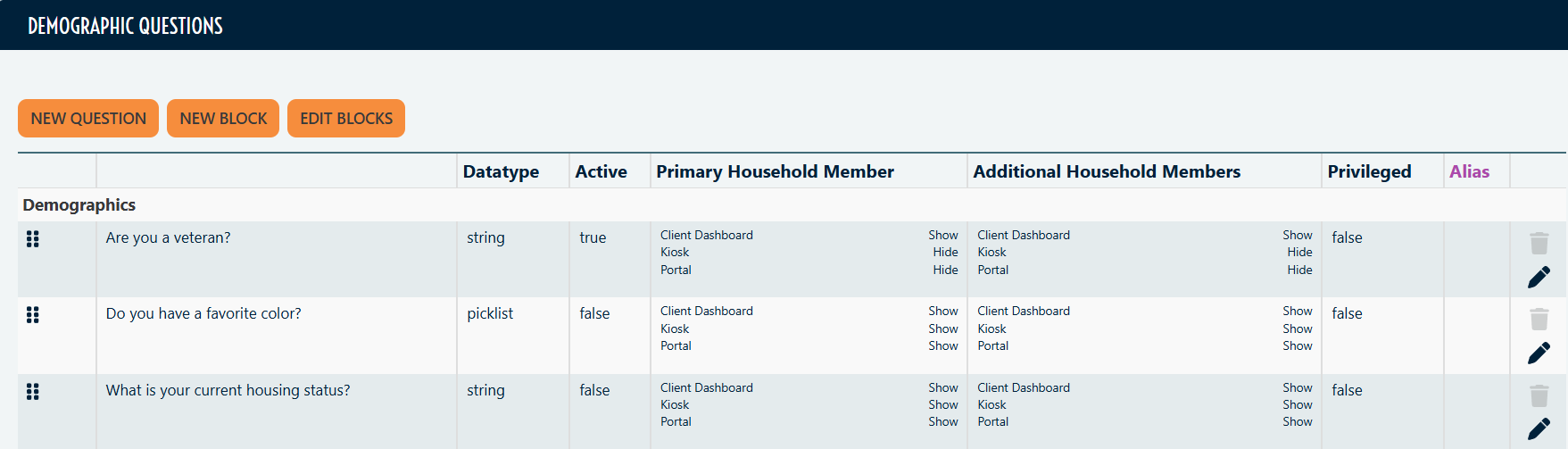
Details:
Inside a Demographic Question, Users can determine if the question is shown, hidden or required for Primary Household Member and/or Additional Household Members. Users have the option to show, hide or require these at the Dashboard, Kiosk and Portal level.
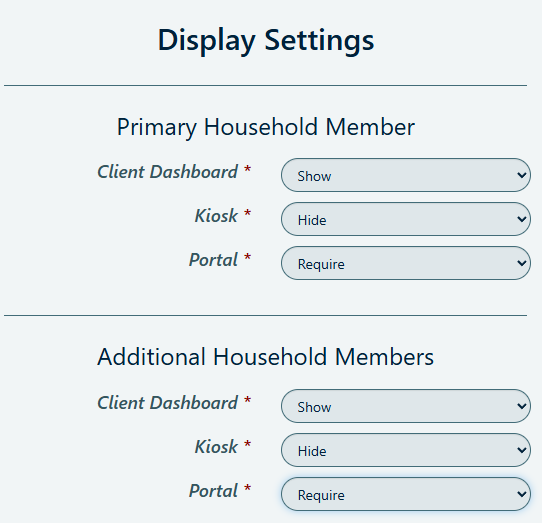
How to access:
Setup > Demographic Questions
Options:
- Show: displays the Demographic Question for Primary or Additional Household Members.
- Hide: hides the Demographic Question for Primary or Additional Household Members.
- Require: requires the Demographic Question for Primary or Additional Household Members.
Notes:
All other functions of Demographic Questions remain unchanged.
Please see our Knowledge Base article on Custom Question Creation for additional information on custom questions!
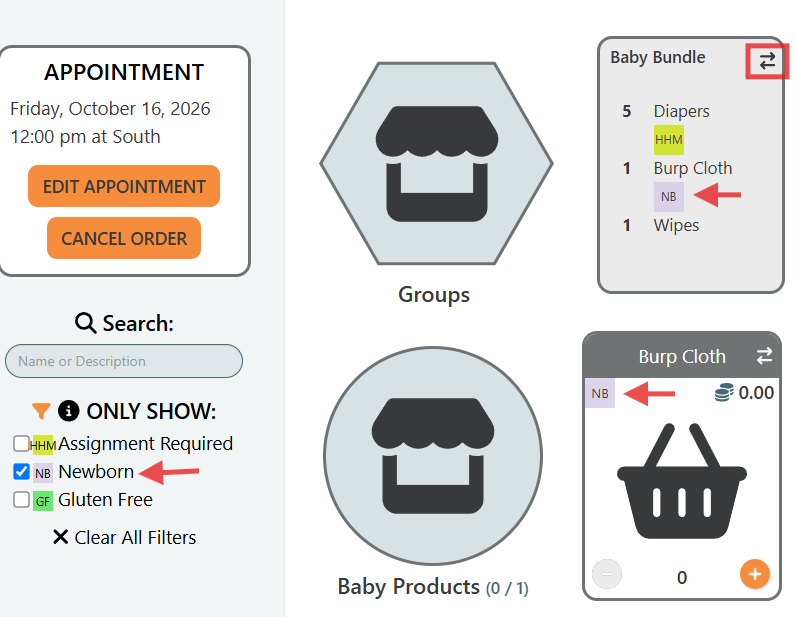
Filtering Tags on Storefront now include Groups
New settings have been added to give Users more control over how Item Tags display and filter on Storefront.
How to access:
Setup > Inventory Settings > Show Item Tags on Group Tiles

Details:
When this setting is set to Yes, Item Tags will be visible on the back of the group tile, and can be filtered.
Household Size on Visit Screen
New settings have been added to give Users more control over Household Size display on Visit screens.
How to access:
Setup > Visit Settings > Household Member Count Display on Visit

Options:
- Show Total: Shows overall Household Member Count.
- Show by Age: Shows Household Member Count by "Child", "Adult" and "Senior."
- Hide: Hides Household Member Count.
Ticket Number Display
New settings have been added to give Users more control over Ticker Number display in Visit Tickets.
How to access:
Setup > Visit Settings > Ticket Number Digits

Details:
Users can use this setting to set the number of Ticket Number digits displayed on Visit Tickets. You can set the digit number from 3 to 6.
For example, if the Visit ID 12345 → 3 digits = "345", 4 = "2345", 5 = "12345".
Notes:
Setting Enable Ticket Number must be set to Yes in order for Ticket Number Digits to display.
Enhancements & Improvements
Improvements to API and an exciting locker announcement!
The following feature are only applicable to organizations utilizing PantrySoft's API.
Paid Feature: Access to PantrySoft's API is an additional feature set. Please contact support@pantrysoft.com if you'd like to use this feature set and don't yet have it activated in your installation.
API supports Inventory
This release brings an improvement to the PantrySoft API: Visits recorded through the API now support Inventory Groups. No additional set up is needed.
Inventory groups now work in the Visit APIIf you record Visits from another system through our API, you can now include Inventory Groups (bundles of items handed out together) on those Visits. The API follows the same rules your team already set up for the dashboard, so a Visit created through the API is held to the same limits as one entered by staff.
What this means for you
- Same rules everywhere. Your Item Group, Item Limit, Choice value, and household rule settings now apply to API Visits too.
- Group stock is tracked. When a group is given out through the API, the Items in it come out of your available Inventory, just like on the dashboard.
- Clearer error messages. If a Visit breaks one of your rules (for example, a household goes over its Item Limit), the API now explains exactly what went wrong so your integration can fix it.
How to use it
There is nothing to turn on. The API uses the settings you already have. To review them:
- Go to Settings and open your inventory and visit settings.
- Check that Enable Item Groups is on, along with any limits you want enforced (such as Expanded Item Limit or Enable Choice Value).
- If you want API visits to draw from current stock, turn on Use Available Inventory Items to Create Groups.
Good to know: Items tagged as dashboard-only or kiosk-only cannot be added to visits through the API.
Click N Collect Locker Integrations now available
- PantrySoft now offers Locker integrations with Click N Collect! If you are interested in learning more, please contact support@pantrysoft.com